Adobe Podcast
Adobe Podcast uses the power of AI to make recording and editing podcasts easy!
Login Instructions
- Click the button above or go to podcast.adobe.com (works best in Chrome browser)
- Click Sign In
- Log in with your Microsoft 365 credentials (@students.cobbk12.org)
- Scroll down and click Studio or Record a Podcast
Features
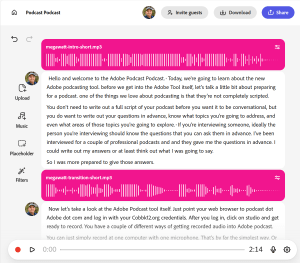
- Record and edit in a web browser–no software installation required
- Easily cut, copy, and paste words and phrases using the transcript that is automatically generated when you record.
- Use Adobe’s speech enhancement filter to remove background noise and echo
- Invite guests to log in and record remotely from their own computers
- Add intro and transition music from Adobe’s royalty-free collection.
- Adobe Podcast can even transcribe in French, German, Italian, Spanish, Portuguese! After logging in, click on your account avatar in the top right corner to change the language.
Recording Options
- Adobe Podcast can record from a single computer using the built-in microphone. For recordings with only one or two speakers sitting in front of a laptop, this works great.
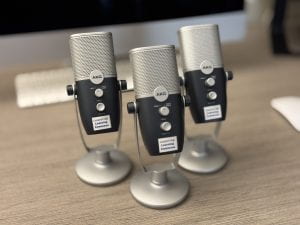
- For groups with more than two speakers (in the same room), you can check out a microphone from the learning commons, place it in the center of the group, and record from all sides.
- Adobe Podcast also has “remote recording,” which allows a host to record multiple participants at once, each using their own devices in other locations.
- Finally, you upload audio recorded in other devices and use it in Adobe Podcast.
TIP: If you want to use audio or video recorded on your phone in Adobe Podcast, use the OneDrive mobile app to upload content to your school Microsoft 365 account.