NoodleTools Expert | Part 5: Documenting Your Evidence
Get credit for all your hard work (and give credit to others for theirs): Use NoodleTools to correctly format in-text citations for all the information you gathered from your sources and create a final bibliography page to attach to your finished paper!
Vocabulary Lesson
Before proceeding, it’s important to understand a few of the terms used in documentation.
- In-Text Citation: This is any type of source citation that appears in the text of your paper. They should connect each individual piece of information with its source.
- Parenthetical Citation: These are a type of in-text citation that appears in parentheses (Glickman 2027). MLA and APA use parenthetical citations. Chicago style gives the option of parenthetical citations or numbered footnotes.
- Footnotes: Numbered footnotes are small, superscript numbers1 in the text pointing to source information at the bottom of each page.
- Bibliography: Any list of sources could be referred to generally as a bibliography. For example, a stand-alone list of sources on a topic would be referred to as a bibliography. However, different citation styles have specific terms for lists of sources. In Chicago style, Bibliography is the term used for the full list of sources cited in the paper. It should not include sources that aren’t cited in the paper.
- References: In APA style, References is the term used for the full list of sources cited in the paper. It should not include sources that aren’t cited in the paper.
- Works Cited: In MLA style, Works Cited is the term used for the list of all sources cited in the paper. It should not include sources that aren’t cited in the paper.
1Andy Spinks, “NoodleTools Expert | Part 5: Documenting Your Evidence,” Campbell Commons, Campbell High School, Published October 30, 2025, https://www.campbellcommons.com/noodletools/become-a-noodletools-expert/noodletools-expert-part-5-documenting-your-evidence/.
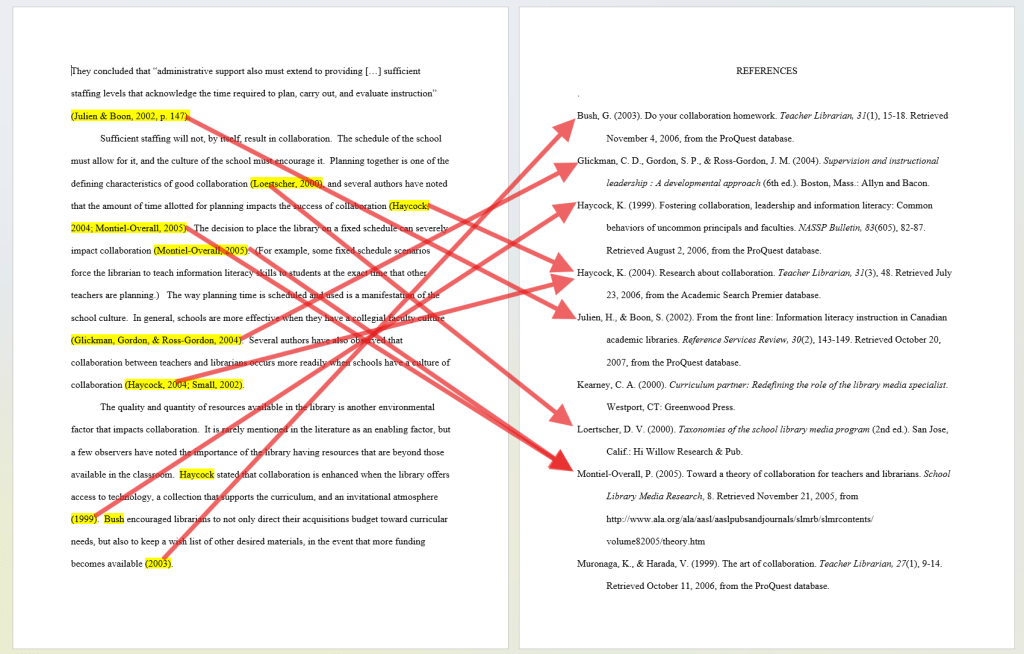
Regardless of the citation style or terminology, the in-text citations and the sources list work together: The in-text citation connects the information you used from a source with the detailed entry in the list of sources at the end of the paper.
Creating In-Text Citations
NoodleTools can help you create in-text citations for the information you are including from your sources.
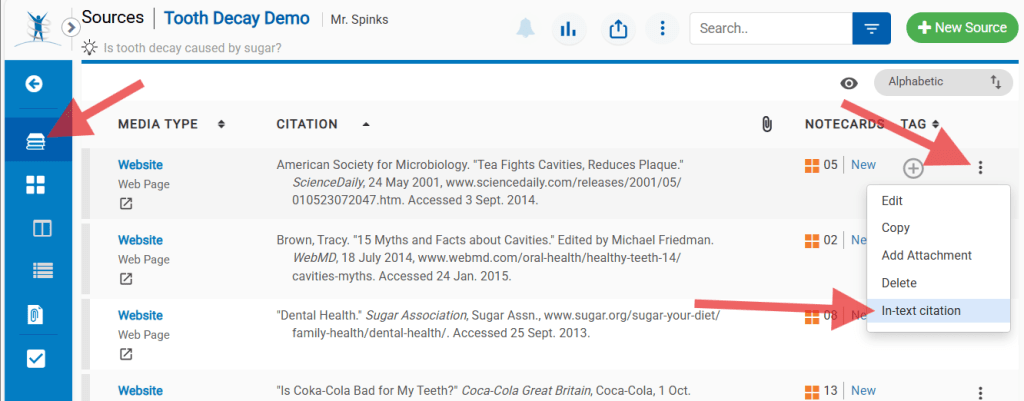
You can open the in-text citation guidance in NoodleTools from the Sources list or from the Notecard view:
From Sources List
- Open the Sources list
- Click on the menu icon ( ⁝ ) at the right of a source
- Click “In-text citation” or “Footnote format”
From Notecards
- Open the notecard for the info you are citing
- Click on “In-text Reference” or “Footnote format”) in the top right corner
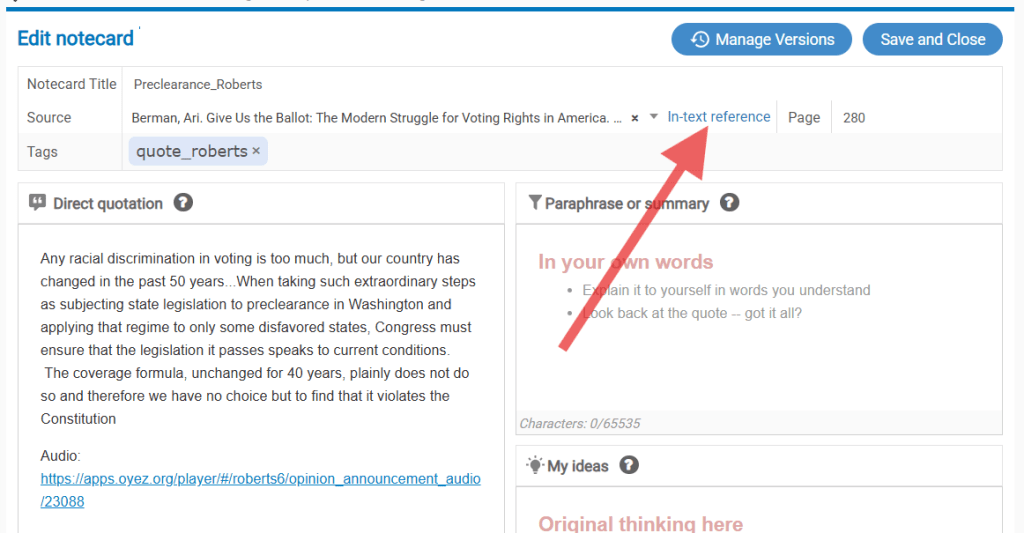
This opens up a window with a suggested format for the parenthetical citation or footnote (depending on the style of your project).
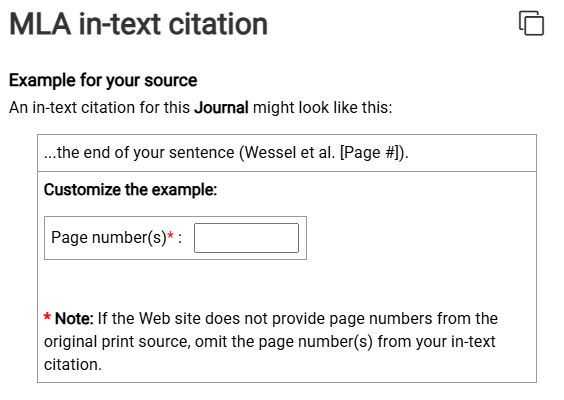
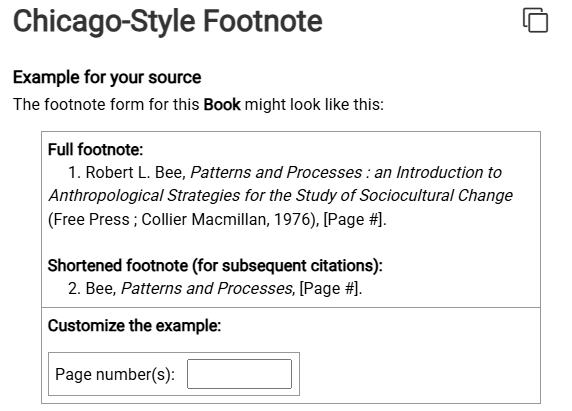
You will need to read the instructions on this screen regarding how to handle page numbers and how to incorporate the citation into your writing. Several things to note:
- If you are citing a page number (or page range) you can enter it in the box and NoodleTools will add it to the example.
- If you are citing an entire work or a work with no page numbers, you may need to manually delete the page number placeholder from the example.
- Below the example citation, NoodleTools gives and detailed mini-guide to incorporating in-text citations into your writing. Scroll down (below the example) and read it!
More info: How to generate an in-text citation when I use something from a notecard in my paper
Export/Print Source Lists (Works Cited, References, Bibliography)
NoodleTools also makes it easy to export a list of your sources—formatted according to the citation style of your project.
Learn
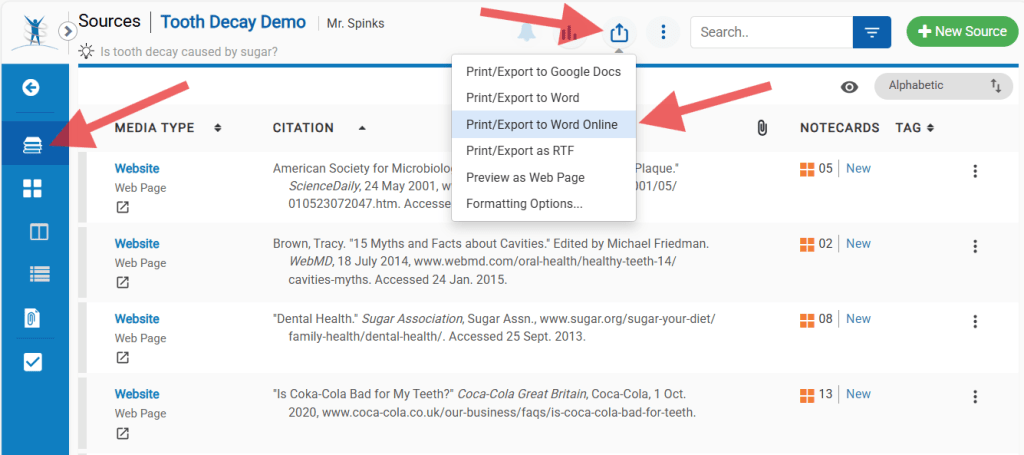
- Open your NoodleTools project and navigate to the Sources page.
- Click the Print/Export icon on the toolbar at the top of the screen.
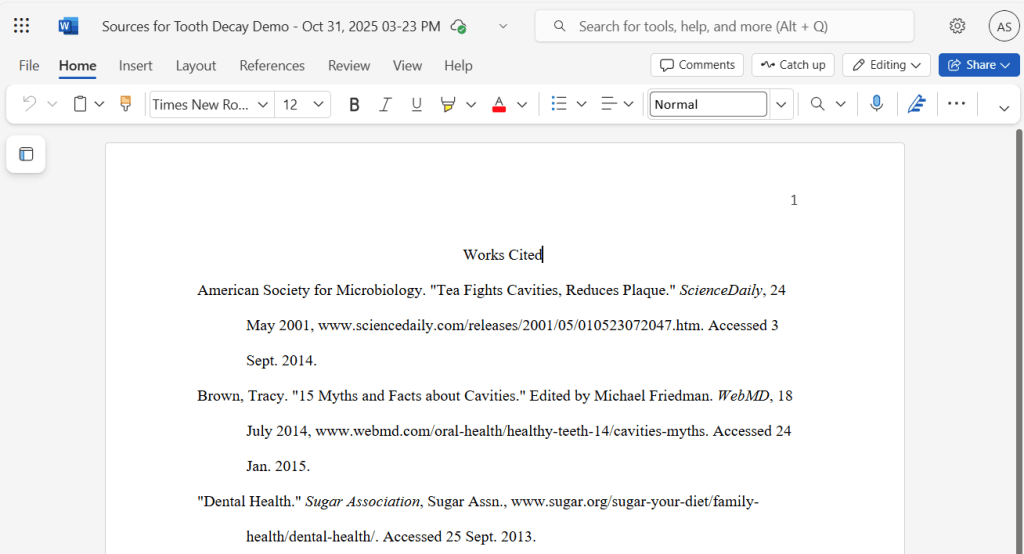
- Choose Print/Export to Word Online or one of the other Print/Export options.
- Select “All Sources” and click “Submit.”
Apply
When you are ready to turn in a draft of your research paper, be sure to export, edit and attach your list of sources
- Export the sources list using the instructions above.
- Open (or print) both the sources list and the body of your paper. Go through your citations and:
- Confirm that each in-text citation in the body has a corresponding entry in the sources list.
- Delete any entries in the sources list that aren’t referenced in the body of the paper.
- Add a page break at the end of your paper. Copy the finalized sources list and paste it into the new page.
- Confirm that the sources list has the correct title (Works Cited, References, or Bibliography) and is formatted correctly for the citation style.
More Info: How to export and print source citations